| 일 | 월 | 화 | 수 | 목 | 금 | 토 |
|---|---|---|---|---|---|---|
| 1 | 2 | 3 | ||||
| 4 | 5 | 6 | 7 | 8 | 9 | 10 |
| 11 | 12 | 13 | 14 | 15 | 16 | 17 |
| 18 | 19 | 20 | 21 | 22 | 23 | 24 |
| 25 | 26 | 27 | 28 | 29 | 30 | 31 |
- UE5
- DirectX12
- ShadowMap
- texture
- unrealengine
- deferred
- rendering
- SIMD
- GPU
- wave
- GPU Driven Rendering
- Study
- atmospheric
- Nanite
- hzb
- scattering
- scalar
- ue4
- optimization
- Shadow
- 번역
- VGPR
- RayTracing
- Wavefront
- SGPR
- Graphics
- DX12
- shader
- vulkan
- forward
- Today
- Total
RenderLog
VolumeLight 본문
VolumeLight
최초작성 : 2020-06-02
마지막수정 : 2020-06-24
최재호
목표
[Nvidia]VolumeLight 번역 의 구현을 이해해봅니다.
내용
이 문서를 한번 정도 읽었다고 가정하고 진행되므로 [Nvidia]VolumeLight 번역를 읽어보시길 권장 합니다.
분석할 코드는 Nvidia 홈페이지 코드로 진행했습니다. Nvidia 코드
OpenGL 을 기준으로 작동할 수 있도록 변경하였습니다.
코드를 보면 사용되는 렌더타겟과 렌더링 패스가 상당히 많습니다.
이 부분을 먼저 이해하는 것이 이해를 더 쉽게 해주기 때문에 먼저 내용을 보겠습니다.
렌더패스는 Git에 올려둔 코드에 똑같은 번호가 붙어있어서 참고하시면 됩니다.
[기본 정보]
메인 렌더타겟 크기 SCR_WIDTH, SCR_HEIGHT : (1280, 720)
쉐도우 맵 크기 SM_WIDHT, SM_HEIGHT : (2048, 2048)
Directional Light 정보
- Orthogonal Projection (반드시)
- Width, Height : (2500.0f, 2500.0f)
[렌더타겟 종류]
1. ShadowMapWorldRT (R32) : (SM_WIDHT)
- ShadowMap Depth를 World Space 기준으로 변경함
2. ShadowMapWorldMipsRT (RG32) : (SM_WIDHT / 2), (SM_WIDHT / 4) (SM_WIDHT / 8) (SM_WIDHT / 16)
- ShadowMapWorldRT의 일정 타일 크기당 Min, Max를 계산
3. ShadowMapWorldScaledOptRT (R32) : (SM_WIDHT / 16)
- ShadowMapWorldMipsRT 최종 결과
4. ShadowMapHoleRT (R32) : (SM_WIDHT / 16) (SM_WIDHT / 16)
- 일정 크기 이하의 구멍들을 모두 제거
- Indoor 의 LightVolume이 더 강한 빛을 만들어 주는데 사용. (Light Density 조정용)
5. MainSceneRT (RGBA32) : (SCR_WIDTH, SCR_HEIGHT)
- MainScene Color/Depth 렌더
6. LightVolumeHDRRT (RGBA32) : (SCR_WIDTH / 4, SCR_HEIGHT / 4)
- 라이트 볼륨 렌더링
7. ConvertDepthWorldNormalizedRT (R32F) : (SCR_WIDTH, SCR_HEIGHT)
- MainScene의 Depth를 World Scale로 변경
8. EdgeDetectionRT (RG32F) : (SCR_WIDTH / 4, SCR_HEIGHT / 4)
- Sobel Filter로 Edge Detection 결과 담김
9. EdgeBlurRT (R32F) : (SCR_WIDTH / 4, SCR_HEIGHT / 4)
- EdgeDetectionRT(Sobel Filter) 결과에 Edge의 방향 기준 Blur
10. EdgeGradientBlur (R32F) : (SCR_WIDTH / 4, SCR_HEIGHT / 4)
- EdgeBlurRT에 9x9 일반 블러
[렌더링 패스 순서]
1. ShadowMapRender
2. MainSceneRender
- MainSceneRT
3. ConvertDepthToWorldScale
- ShadowMapWorldRT
4. Generate Min/Max ShadowMap Mip level
- ShadowMapWorldMipsRT[0] ~ [3]
- ShadowMapWorldScaledOptRT
5. Fill the holes
- Min 3 회
- Max 5 회
6. Generate LightVolume
7. MainSceneDepth To WorldScale
8. EdgeDetectionSobel
9. GradientBlur
- Sobel filter로 얻어진 Edge 방향으로 필터링
10. ImageBlur
11. Final : 최종 장면에 ImageBlur 까지 마친 LightVolume 적용
렌더링 패스에서 주목할 만한 부분만 소개하겠습니다. 전체 코드는 Git 에 공개 되어있습니다.
Depth 에서 World Position 구하기 (Depth -> WorldScale Z 구하기)
#version 330 core

precision mediump float;

uniform sampler2D tex_object;
uniform vec3 LightPos;
uniform vec3 LightForward;
uniform mat4 LightVPInv;

in vec2 TexCoord_;
out vec4 color;

void main()
{
    float depth = texture2D(tex_object, TexCoord_).x;

    vec4 clipPos;
    clipPos.x = 2.0 * TexCoord_.x - 1.0;
    clipPos.y = 2.0 * TexCoord_.y - 1.0;
    clipPos.z = 2.0 * depth - 1.0;          // OpenGL은 NDC 공간이 Z : -1 ~ 1
    clipPos.w = 1.0;

    vec4 posWS = LightVPInv * clipPos;
    posWS /= posWS.w;

    float WorldZ = dot(posWS.xyz - LightPos, LightForward);
    color = vec4(WorldZ, WorldZ, WorldZ, 1.0);
}
Fill the holes
작은 구멍을 막아버린 Texture와 그렇지 않은 Texture에 같은 UV 텍셀을 Fetch 하여 Depth 차이가 나는 경우 Light Volume Density를 더 높게 설정해주는 용도. Indoor 의 경우 Light Volume을 더 두드러지게 해줍니다.
주변 픽셀중 Min Pixel을 선택 3회 후, 주변 픽셀중 Max Pixel 선택 5회
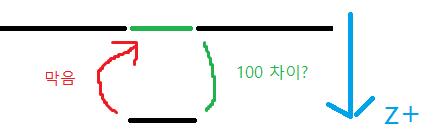


그림3. Min/Max(좌) 부터 Fill the holes(우) 되는 과정
Light Volume 생성
1. MainScene Depth Buffer로 부터 WorldPosition을 복원합니다.
float SceneDepth = texture2D(tex_object, TexCoord_).x;

vec4 clipPos;
clipPos.x = 2.0 * TexCoord_.x - 1.0;
clipPos.y = 2.0 * TexCoord_.y - 1.0;
clipPos.z = 2.0 * SceneDepth - 1.0;
clipPos.w = 1.0;

vec4 posWS = CameraVPInv * clipPos;
posWS /= posWS.w;
2. Eye 위치 기준 현재 픽셀의 방향과 거리를 구합니다. 여기서 구헌 거리가 LightVolume의 Density를 계산하는데 쓰임
vec3 vecForward = normalize(posWS.xyz - EyePos.xyz);
float traceDistance = dot(posWS.xyz - (EyePos.xyz + vecForward * CameraNear), vecForward);
traceDistance = clamp(traceDistance, 0.0, 2500.0); // Far trace distance

posWS.xyz = EyePos.xyz + vecForward * CameraNear;
vecForward *= 2.0 * (1.0 / 4.0);
3. vecForward 기준 몇번이나 LightVolume Density를 계산해야할지 계산
int stepsNum = int(min(traceDistance / length(vecForward), float(MAX_STEPS)));4. vecForward 방향으로 이동시에 ShadowMap 기준으로 얼마만큼 이동하는지 텍스쳐 UV 및 WorldDepth 기준 Delta 계산
// NearPlane에서 위치를 얻어낸다. 이 좌표의 x, y를 텍스쳐 좌표, z는 월드의 z값.
float jitter = 1.0;
vec3 curPosition = posWS.xyz;
shadowUV = LightVP * vec4(curPosition, 1.0);
coordinates = shadowUV.xyz / shadowUV.w;
coordinates.xy = (coordinates.xy + vec2(1.0)) * 0.5;
coordinates.z = dot(curPosition - LightPos, LightForward);

// NearPlane에서 Forward 방향으로 (한 스탭 + 스탭 나아간 위치)를 얻어낸다. 이 좌표의 x, y를 텍스쳐 좌표, z는 월드의 z값.
curPosition = posWS.xyz + vecForward;
shadowUV = LightVP * vec4(curPosition, 1.0);
vec3 coordinateEnd = shadowUV.xyz / shadowUV.w;
coordinateEnd.xy = (coordinateEnd.xy + vec2(1.0)) * 0.5;
coordinateEnd.z = dot(curPosition - LightPos, LightForward);

vec3 coordinateDelta = coordinateEnd - coordinates;
5. LightVolume Step의 최적화를 위한 코드입니다.
5.1) vecForward 가 ShadowMap Texture UV 기준 얼마만큼의 Offset인지구합니다.
5.2) CoarseDepthTexlSize : SM_WIDTH / 128 으로, Fill the hole, min/max texture의 사이즈가 128이므로 텍스쳐를 이 크기 단위로 Fetch 하여 중복 계산을 피하는 것이 목표입니다.
5.3). longStepScale_1 이 longStepScale - 1인 것은 뒤에 코드에 나오겠지만 기본적으로 1회 연산 이외의 부분을 고려하기 위해서 입니다. [ ex. light += scale * sampleFine * (1.0 + isLongStep * longStepScale_1); ]
vec2 vecForwardProjection;
vecForwardProjection.x = dot(LightRight, vecForward);
vecForwardProjection.y = dot(LightUp, vecForward);

// Calculate coarse step size
float longStepScale = int(CoarseDepthTexelSize / length(vecForwardProjection));
longStepScale = max(longStepScale, 1);
float longStepScale_1 = longStepScale - 1;
6. LightVolume의 Light Density 계산
6.1) LightVolume Density 계산을 위해 Tracing 하는 방향


float sampleFine;
float light = 0.0;
float coordinateZ_end;
bool optimizeOn = true;

int i = 0;
for (; i < stepsNum; i++)
{
    // 텍스쳐 UV 영역을 벗어나는 부분 회피
    if ((coordinates.x > 1.0 || coordinates.x < 0.0) || (coordinates.y > 1.0 || coordinates.y < 0.0))
    {
        if (optimizeOn)
        {
            coordinates += coordinateDelta * (1.0 + longStepScale_1);
            i += int(longStepScale_1);
        }
        else
        {
            coordinates += coordinateDelta;
        }
        continue;
    }

    // Min/Max Texture Fetch (SM_WIDHT / 16)
    vec2 sampleMinMax = textureLod(tex_object3, coordinates.xy, 0).xy;

    // ShadowMap WorldZ Fetch (SM_WIDTH)
    float ShadowMapWorld = texture2D(tex_object2, coordinates.xy).x;
    sampleFine = float(ShadowMapWorld > coordinates.z);

    // Fill the hole Texture Fetch (SM_WIDHT / 16)
    float zStart = textureLod(tex_object4, coordinates.xy, 0).x;

    // Light Volume Attenuation
    const float transactionScale = 100.0;

    float attenuation = (coordinates.z - zStart) / ((sampleMinMax.y + transactionScale) - zStart);
    attenuation = clamp(attenuation, 0.0, 1.0);
    attenuation = 1.0 - attenuation;
    attenuation *= attenuation;

    float attenuation2 = ((zStart + transactionScale) - coordinates.z) * (1.0 / transactionScale);
    attenuation2 = 1.0 - clamp(attenuation2, 0.0, 1.0);
    attenuation *= attenuation2;

    // Fill the hole texture 와 현재 Depth 중 현재 Depth가 더 크다는 말은 ShadowMap에서 거리다 더 말다는 뜻이며
    // 이 것은 Hole 이 채워져서 막혔다는 의미가 됨. 그래서 Density를 더 높혀줘서 잘 보이도록 함.
    float density = float(zStart < coordinates.z);
    density *= 10.0 * attenuation;
    //density += 0.25;
    sampleFine *= density;

    if (optimizeOn)
    {
        // 2048/128 에 비례한 텍스쳐 크기를 고려한, Min/Max Depth 값으로 Coarse Step 진행 가능 여부 체크
        coordinateZ_end = coordinates.z + coordinateDelta.z * longStepScale;

        // 현재 Min/Max 타일 영역의 Min 값과 비교하여 Light, Shadow 여부 파악
        // MinZ < CurZ < MaxZ 의 경우는 Min/Max 타일 영역 내에서 isLight, isShadow 여부가 변경될 수 있기 때문에 그냥 보통 Step을 진행하지만
        // CurZ < MinZ, CurZ > MAxZ 의 경우는 타일 영역 전체의 극소, 극대 값 범위 밖이기 때문에 isLight, isShadow 가 확실하다고 볼 수 있음.

        float comparisonValue = max(coordinates.z, coordinateZ_end);
        float isLight = float(comparisonValue < sampleMinMax.x); // .x stores min depth values

        comparisonValue = min(coordinates.z, coordinateZ_end);
        float isShadow = float(comparisonValue > sampleMinMax.y); // .y stores max depth values

        // We can perform coarse step if all samples are in light or shadow
        float isLongStep = isLight + isShadow;

        longStepsNum += isLongStep;
        realStepsNum += 1.0;

        light += scale * sampleFine * (1.0 + isLongStep * longStepScale_1);		// longStepScale should be >= 1 if we use a coarse step
        coordinates += coordinateDelta * (1.0 + isLongStep * longStepScale_1);
        i += int(isLongStep * longStepScale_1);
    }
    else
    {
        light += scale * sampleFine;
        coordinates += coordinateDelta;
    }
}

light -= scale * sampleFine * (i - stepsNum);

color = vec4(vec3(light), 1.0);
Edge Detection 후 Blur 처리
LIghtVolume을 만들어 낼때 사용한 해상도와 실제 MainScene 렌더링시 해상도 차이로 읺해 발생하는 앨리어싱을 최소화 하기 위해서 Edge 부분을 검출하고 검출한 Edge의 방향을 기준으로 Blur 처리 합니다.
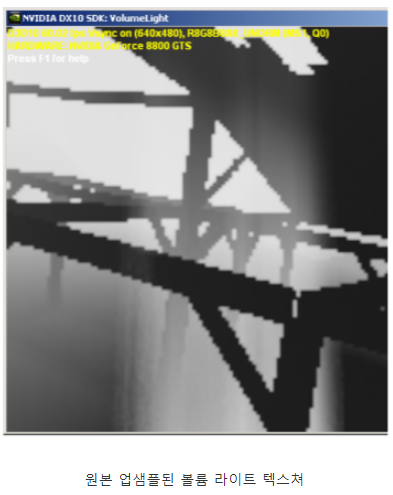
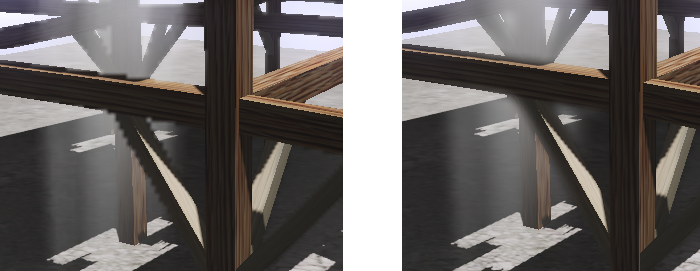
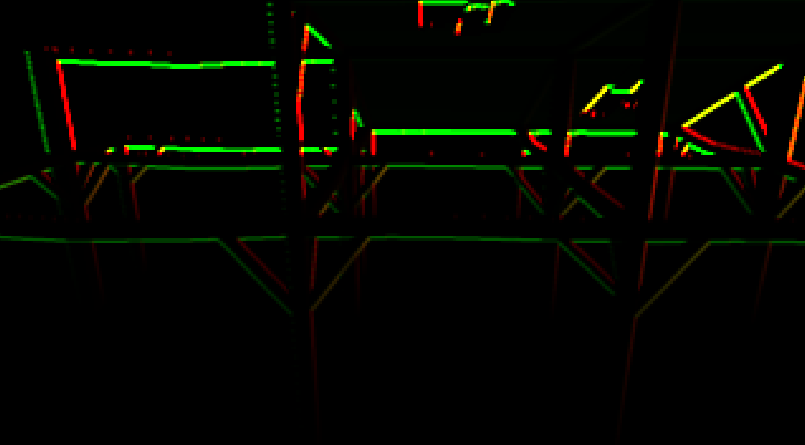
그림8. 소벨 에지 디텍션
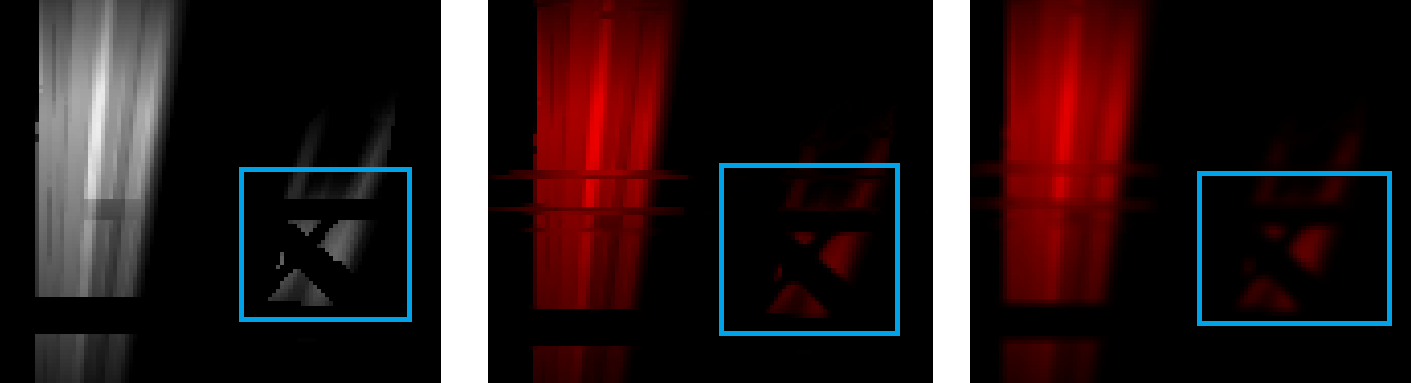
이미지 블러 처리
#version 330 core

precision mediump float;

uniform sampler2D tex_object;		// EdgeDetectionSobel
uniform sampler2D tex_object2;		// LightVolumeTexture
uniform float CoarseTextureWidthInv;
uniform float CoarseTextureHeightInv;

in vec2 TexCoord_;
out vec4 color;

void main()
{
	vec2 gradient = texture(tex_object, TexCoord_).xy;

	vec2 offset;
	offset.x = CoarseTextureWidthInv * gradient.y;
	offset.y = CoarseTextureHeightInv * gradient.x;

	float result = 0.0f;

	// 에지의 방향을 기준으로 블러를 진행한다. Sobel 은 Edge가 아닌 부분은 모두 0이 됩니다.
    // 또한 X와 Y의 Edge 탐지를 별도로 합니다.
	for (int iSample = -7; iSample < 8; iSample++)
		result += texture(tex_object2, TexCoord_ + offset * iSample).x;

	result *= (1.0 / 15.0);
	color.x = result;
}
결과

구현 코드
https://github.com/scahp/Shadows/tree/LightVolume
레퍼런스
'Graphics > Graphics' 카테고리의 다른 글
| Smooth Min (IQ's polynomial smooth minimum) (3) | 2020.07.17 |
|---|---|
| Cascade Shadow Map (2) | 2020.07.10 |
| Forward Plus Rendering (0) | 2020.05.26 |
| PCSS(Percentage-Closer Soft Shadow) (0) | 2020.05.22 |
| Tiled Forward Rendering (0) | 2020.05.12 |


